
Accessing the Amelia Platform
Reading Time: ≈2 min
Introduction
Amelia is available through a wide variety of user interfaces: web, phones, tablets. Almost any computing device works. Amelia also can display as a popup available on customer websites. The minimum requirements are internet access plus a web browser. Software applications also can connect with Amelia.
What You’ll Learn
In this topic you'll learn about:
Amelia and Browser Compatibility
Amelia works with these web browsers. Chat and custom user interfaces display as noted for iOS and Android. However, the Amelia administration pages are not optimized for mobile use.
| OS | IE | Chrome | Firefox | Safari |
|---|---|---|---|---|
|
PC |
|
|
|
|
|
Mac |
|
|
|
|
|
iOS |
|
|
|
|
|
Android |
|
|
|
|
 (Edge)
 = Not Applicable
Access an Amelia Instance
Amelia instances are available at this URL where hostname is the domain name of the webhost server:
https://hostname/Amelia/login

Figure 1. Amelia Login Screen
Sign up to Access Amelia
You will need to work with your Amelia Engagement Manager to set up access for logins to Amelia.
Log in to Access Amelia
To log in to Amelia, go to this URL where hostname is the domain name of the webhost server:
https://hostname/Amelia/login
Then fill out the username and password fields. In some cases, you will need to specify the login protocol.
Log out of Amelia
To log out of Amelia, click the Account button in the top right of any workspace. Then click the Logout link that appears in the Account popup.
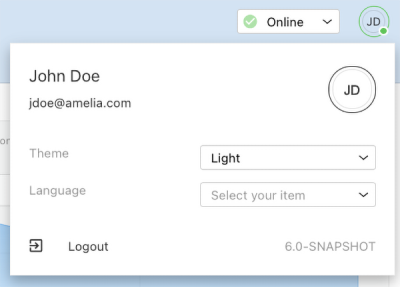
Figure 2. Profile Dropdown.
More Resources
For more information, see:

